How Test Automation Improves Mobile Game Testing

Mobile games account for more than half of the global gaming market revenue. Players expect smooth performance, quick response times, and bug-free updates.
Delivering that experience is challenging because every release must function across thousands of device models, various operating systems, and unpredictable network conditions.
Most studios update their games on a weekly or monthly basis with new levels, events, or monetization features. Each update carries the risk of breaking existing functionality, causing lag, or introducing payment errors. Manual testing alone cannot scale to this demand. Automated testing is now central to how gaming studios maintain release quality and protect the integrity of the gameplay experience.
In this article, let us learn in detail about the challenges solved by automation testing and how it helps deliver great gameplay experiences.
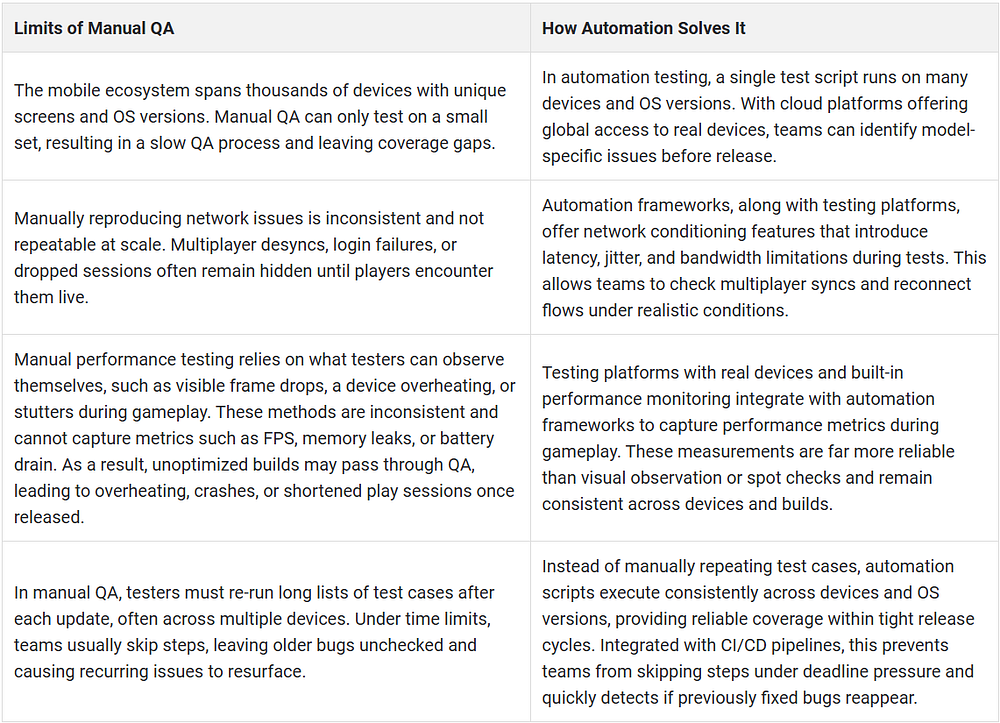
Manual QA vs. Automation in Mobile Game Development
Testing Frameworks for Mobile Game Automation
Appium
Appium automates UI interactions across iOS and Android. It is widely used to validate menus, navigation, and gameplay flows where user input is required.
Espresso
Espresso is Android’s native automation framework. It integrates with the Android testing ecosystem and is helpful in verifying in-game UI elements and functional flows.
XCUITest
XCUITest is Apple’s native framework for iOS. It is used to test gameplay flows, UI components, and functional stability on iPhones and iPads.
Unity Test Framework
For Unity-built games, this framework supports both play mode and edit mode tests. It helps developers verify object behavior, physics logic, and scene interactions directly inside the engine.
HeadSpin’s Key Differentiators for Game Testing
Flexible Deployment Options
Choose between cloud-based, on-premise, or air-gapped deployments depending on how your studio manages infrastructure and sensitive builds.
Dedicated Gameplay Testing Labs
Record and analyze entire gameplay sessions to review playtester interactions, performance data, and quality metrics across devices and networks.
Support for AltUnity and 60+ Automation Frameworks
Use AltUnity for Unity-based games or connect any of the 60+ supported frameworks to match your existing testing workflows.
Game Engine Performance Testing
Measure the builds created on engines like Unreal and understand how your engine handles rendering and graphics to catch bottlenecks early and deliver smoother gameplay.
Conclusion
Mobile game testing will only become more complex as devices, networks, and player expectations continue to evolve. Automation provides the foundation to handle functional validation, regression coverage, and performance measurement at scale, while manual testing continues to guide creative and experiential aspects.
The way forward for studios is a balanced approach, utilizing automation to handle repetitive and performance-intensive checks while reserving manual effort for exploratory testing and refining the player experience. Teams that adopt this mix can keep pace with rapid release cycles without compromising quality.
HeadSpin supports this approach by providing access to real devices and carrier networks worldwide, helping studios validate their games under real-world conditions.
Originally Published:- https://www.headspin.io/blog/automation-mobile-game-testing


Comments
Post a Comment