Mobile App QA Testing: Strategies, Tools & Real-Device Testing Explained (2026)

Mobile app quality is not always lost in a crisis. More often, it slips through in small ways: a login screen that behaves differently on one Android model, a payment flow that breaks on a weak signal, a push notification that never appears after the app is backgrounded, or a feature that looks fine in a simulator but falls apart on real hardware. That is exactly where mobile app QA testing matters most.
Modern mobile QA is not just about finding bugs before release. It is about proving that an app works across devices, operating systems, network conditions, and real user journeys. Android’s testing guidance frames testing as a core part of development, and Apple likewise distinguishes between simulation and real hardware when choosing how to validate app behavior.
What is Mobile App QA Testing?
Mobile app QA testing is the process of verifying that a mobile application works as expected before and after release. It covers correctness, usability, performance, security, compatibility, and reliability across real usage conditions. In simple words, it is the discipline that answers one simple question: will this app hold up when real people use it on real phones, real networks, and real operating systems? Android’s official guidance explicitly ties testing to correctness, functional behavior, and usability before release, while HeadSpin’s current QA article frames mobile QA as a systematic process covering performance, usability, security, and overall user satisfaction.
A good mobile QA practice is broader than a test pass. It includes planning, environment setup, manual validation, automation, regression coverage, release checks, and ongoing quality monitoring. That is why the best teams treat QA as part of product delivery, not a final gate at the end.
Why Mobile App QA Testing is Critical for App Success
A mobile app competes in a brutally impatient environment. Users do not separate product quality from app quality. If checkout hangs, login fails after an OS update, screens load slowly on mid-range devices, or gestures behave inconsistently, users rarely think, “this is a temporary QA gap.” They just stop trusting the app.
That is why mobile QA matters at a business level, not just an engineering level. It helps teams reduce release risk, protect ratings and retention, validate core flows before updates ship, and catch device-specific or network-specific issues that desktop-style testing often misses. Android’s own testing docs emphasize consistent testing before release, and HeadSpin’s mobile testing focuses heavily on validating apps across diverse OS versions, device models, and network conditions.
The Biggest Challenge in Mobile QA: Device & Network Fragmentation
Here’s the thing: mobile QA gets hard the moment you leave the comfort of a single test environment.
The same app can behave differently across screen sizes, chipsets, OEM customizations, OS versions, browser engines, memory constraints, and permission models. Then you add unstable bandwidth, packet loss, carrier behavior, roaming conditions, interruptions like calls or notifications, and background/foreground transitions. What looked solid in one setup can quickly turn fragile in another.
Google simply states that you should always test your Android app on a real device before release. Apple also separates testing in Simulator from testing on hardware because those environments are not interchangeable. HeadSpin’s mobile testing pages make the same point from a QA operations angle, highlighting diverse device configurations and network conditions as core validation needs.
Types of Mobile App QA Testing
Mobile QA is not one test type. It is a test mix. The exact balance depends on your app, your risk areas, and your release cadence.
- Functional testing checks whether features work as intended, from login and search to payments, onboarding, and account updates.
- Usability testing checks whether the app feels intuitive, responsive, and easy to navigate on real screens and real form factors.
- Compatibility testing checks the app across different devices, screen sizes, OS versions, and configurations. This is where fragmentation becomes visible fast.
- Performance testing checks launch time, responsiveness, rendering smoothness, memory use, crash behavior, and how the app behaves under different network conditions.
- Security testing validates authentication, session handling, data protection, local storage practices, transport security, and broader mobile hardening expectations. OWASP MASVS is specifically positioned as an industry standard for mobile app security verification.
- Interruption and recovery testing checks what happens when calls, SMS, notifications, battery warnings, permission prompts, or app switching interrupt the flow. Apple’s UI interruption guidance exists for exactly this reason.
- Installation, upgrade, and rollback testing checks install flows, app updates, migration logic, and data persistence across versions.
- Accessibility and localization testing checks whether the app remains usable across languages, layouts, text scaling, screen readers, and regional settings.
Mobile App QA Testing Lifecycle
Strong mobile QA follows a repeatable lifecycle rather than a last-minute scramble.
1. Requirement review
Start by identifying critical user journeys, business risk, supported devices, supported OS versions, and dependency risks.
2. Test planning
Define test scope, device matrix, automation targets, data needs, release criteria, and what must run on every build versus every release.
3. Environment and build setup
Prepare test environment, mocks or stubs where needed, app builds, observability hooks, and access to emulators, simulators, and real devices.
4. Test design and execution
Run smoke, functional, usability, compatibility, interruption, network, performance, and security checks based on risk.
5. Automation and regression
Automate stable, repeatable flows and run them continuously as builds change.
6. Beta and pre-release validation
Use internal and external testing to validate the app outside the core engineering loop. Apple’s TestFlight is built specifically to gather tester feedback before publishing.
7. Release validation and post-release monitoring
Do final sanity checks on release candidates, then continue validating quality after launch so regressions do not go unnoticed.
This lifecycle lines up better with how modern teams ship mobile software than the older “test near the end” model. Google’s Android testing guidance treats testing as integral to development, not an afterthought.
Mobile App QA Testing in CI/CD Pipelines
Mobile QA in 2026 should not wait for a weekly test cycle. It should be wired into delivery.
In practice, that means every meaningful code change triggers at least a smoke layer automatically. Pull requests or merge events can run fast checks in simulators or emulators, while nightly or release-candidate builds run broader suites on real devices. Teams usually collect screenshots, logs, videos, network traces, and failure artifacts so debugging does not start from guesswork.
That model is consistent with Android’s recommendation to run tests consistently during development, and it aligns with HeadSpin’s own mobile testing and automation pages, which highlight CI/CD integration and continuous testing across real devices.
Mobile App QA Testing Strategies
A mobile QA strategy works best when it is layered.
- First, use risk-based testing. Not every screen deserves the same depth. Login, checkout, payments, search, subscription flows, onboarding, and anything tied to revenue or retention should get deeper coverage.
- Second, build a device matrix, not a random device list. Base it on your actual user base, target geographies, OS spread, screen types, performance tiers, and business-critical models.
- Third, keep manual and automated testing complementary. Manual QA is still great for exploratory work, usability judgment, edge-case discovery, and visual oddities. Automation is better for stable regression, repeatable flows, and CI/CD speed. Android’s guidance explicitly recognizes both manual and automated testing approaches.
- Fourth, use real-device validation where it matters most. Simulated environments are useful, but they should not be your only source of confidence.
- Finally, treat quality data as part of QA. Logs, videos, KPIs, network traces, and build-over-build comparisons shorten the distance between failure and root cause.
Manual vs Automated Testing in Mobile QA
Neither manual testing nor automation wins on its own. The real win comes from knowing which one should carry which job.
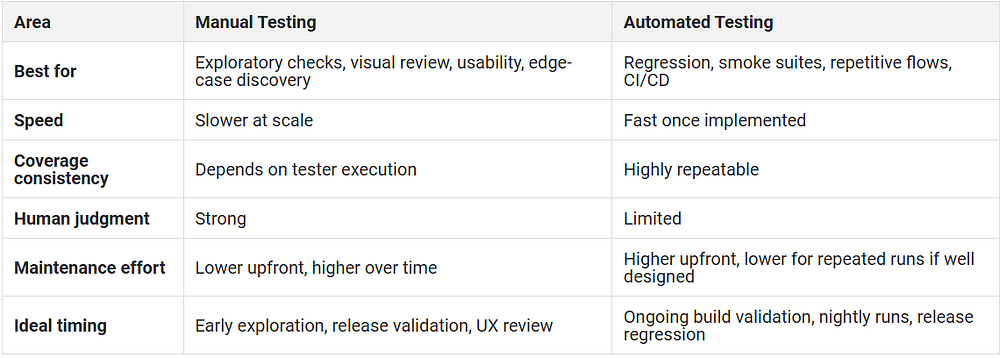
Android’s testing guidance explicitly describes manual testing by navigating the app, using different devices and emulators, changing language, and exercising user flows. Automation frameworks like Appium and Maestro exist to make repeatable UI validation practical across builds.
The practical answer is simple: use manual testing to discover, and automation to scale.
Why Real Device Testing is Essential for Mobile QA
Real device testing matters because users do not run your app inside an idealized lab.
- Real hardware exposes issues tied to memory pressure, CPU constraints, thermals, OEM changes, gesture behavior, cameras, biometrics, notifications, battery state, and networking realities.
- Real networks expose latency, instability, throttling, and regional differences that simulated conditions only approximate. Google’s Android docs say to always test on a real device before release. Apple also distinguishes simulation from hardware testing for scenario selection.
- That does not mean simulators and emulators are useless. They are valuable for fast feedback and early debugging. But when the release decision is on the line, real devices are where confidence becomes believable.
Real Device vs Emulator Testing: Key Differences
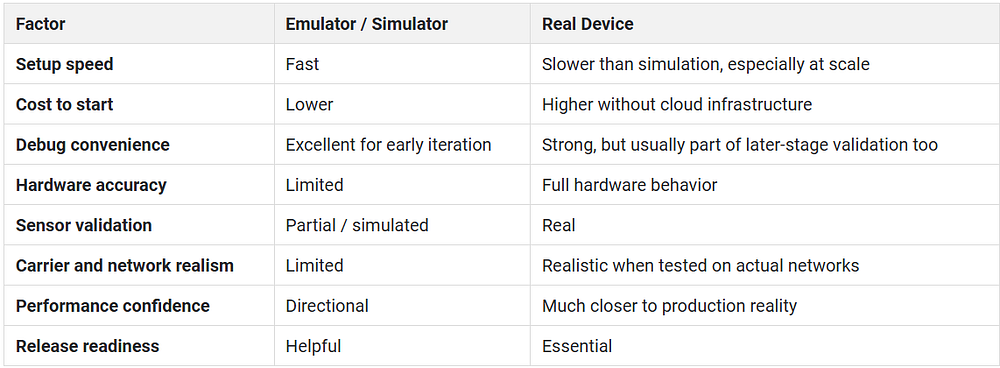
Google recommends testing Android apps on real devices before release, and Apple explicitly documents differences between Simulator and hardware devices. That is the core reason mature teams use both, but trust real devices for final confidence.
Best Mobile App QA Testing Tools
Here are the tools and frameworks most teams evaluate today, depending on app type, team structure, and release model.
- Appium: Appium is an open-source automation ecosystem for many app platforms, including iOS and Android. It remains a strong option for cross-platform mobile UI automation when teams want language flexibility and a broad ecosystem.
- Espresso: Espresso is Google’s Android UI testing framework and is positioned in the official docs as a way to write concise and reliable Android UI tests. It is a strong fit for Android-native teams that want framework-level integration.
- XCUITest / XCTest: Apple’s XCTest framework integrates with Xcode’s testing workflow, and XCUIAutomation is the layer used to control app UI for UI tests. For iOS-native teams, this is the default foundation for automated testing.
- Detox: Detox is an open-source E2E framework for React Native apps. Its docs position it around end-to-end flow testing with high velocity and reduced flakiness, running on a real device or simulator.
- Maestro: Maestro focuses on simple mobile and web UI automation using YAML flows. It is appealing for teams that want readable, lower-friction test authoring.
- Firebase Test Lab: Firebase Test Lab is Google’s cloud-based app testing infrastructure for testing on a range of devices and configurations. It is useful when teams want cloud-based device coverage without managing their own device lab.
- HeadSpin: HeadSpin is best suited for teams that need real-device validation beyond pass/fail automation. Its official pages emphasize SIM-enabled real devices and browsers in 50+ global locations, support for 60+ frameworks including Appium and Selenium, CI/CD integration, and performance visibility across 130+ KPIs on real devices and networks.
Common Challenges in Mobile App QA Testing
Most mobile QA pain points look technical on the surface, but they are really coverage and confidence problems.
- Flaky automation usually comes from weak locators, timing issues, unstable test data, or environment drift.
- Poor device coverage happens when teams over-test in one ideal setup and under-test on the actual device mix that users depend on.
- Late performance discovery happens when performance is checked only after features are considered “done.”
- Release bottlenecks happen when real devices are scarce, shared badly, or reserved too late.
- Network blind spots happen when apps are tested mostly on good Wi-Fi but shipped to users on unstable mobile networks.
- Manual overload happens when teams never move stable journeys into automation.
- Fragmented ownership happens when QA, dev, and product each see different slices of the problem.
The fix is rarely one more tool. It is a better system: stable automation layers, a deliberate device matrix, real-device access, integrated observability, and continuous execution instead of release-week panic. Google, Apple, and HeadSpin’s own testing guidance all point back to the same principle: quality gets stronger when testing is continuous and grounded in realistic environments.
How to Choose the Right Mobile QA Testing Platform
A mobile QA platform should do more than “run tests.”
Look for these criteria:
- Real device access: You need actual hardware coverage, not just simulation, especially for release validation.
- Device and OS breadth: The platform should support the device types, versions, and configurations your users actually rely on.
- Network realism: Weak signal, regional variability, and mobile-network behavior matter for real apps.
- Automation flexibility: It should support the frameworks your team already uses, rather than forcing a tooling reset.
- CI/CD support: Quality should fit into the pipeline, not sit outside it.
- Debugging depth: Screenshots are not enough. Useful artifacts include logs, video, network data, and performance insight.
- Deployment fit: Some teams need hosted testing. Others need hybrid, private, or fully air-gapped options.
These are the same areas HeadSpin emphasizes across its real-device, automation, and performance pages: device breadth, network coverage, automation support, CI/CD integration, and deployment flexibility.
Mobile App QA Testing Checklist
Before a release, this checklist should feel boring. That is a good sign.
- Core user journeys pass on supported devices
- Smoke tests pass on every candidate build
- Critical flows are validated on real devices
- App works across supported OS versions
- Network-sensitive flows are tested beyond ideal Wi-Fi
- Install, update, and session persistence behave correctly
- Permission prompts and interruptions are handled cleanly
- Performance hotspots are reviewed, not assumed
- Security checks follow a defined mobile standard
- Accessibility and localization basics are covered
- Release-blocking defects have clear ownership
- Final signoff happens on a release candidate, not an old build
That checklist reflects the same priorities emphasized by Android’s testing docs, Apple’s hardware-versus-simulator guidance, and OWASP’s mobile security standards.
How HeadSpin Helps Streamline Mobile QA Testing
HeadSpin is useful when a team has moved beyond “does the script pass?” and needs to answer a harder question: how does the app actually behave in real conditions?
According to HeadSpin’s official product pages, teams can run testing on SIM-enabled real devices and browsers across 50+ global locations, with support for hosted, hybrid, and fully on-prem or air-gapped deployments. That matters for organizations that need both coverage and control.
HeadSpin also supports functional, performance, and regression testing across Android and iOS applications under varied device, OS, and network conditions. On the automation side, it supports 60+ frameworks, including Appium and Selenium, offers CI/CD integration, and includes an inbuilt Appium Inspector for validating UI elements.
For manual and hybrid workflows, Mini Remote lets testers interact with real devices remotely to validate gesture-heavy journeys. For deeper diagnosis, HeadSpin’s performance pages say the platform captures 130+ KPIs on real devices and networks and layers in regression intelligence, Grafana dashboards, and alerting to help teams spot degradation faster.
What this really means is simple: HeadSpin helps QA teams test like users live, not like demos behave.
Conclusion
Mobile app QA testing is no longer just a release checkpoint. It is the system that protects app quality across fragmented devices, unstable networks, fast release cycles, and user expectations that are far less forgiving than most teams admit.
The smartest mobile QA programs combine manual exploration, reliable automation, CI/CD execution, and real-device validation. That mix is what turns QA from a bug-finding function into a release confidence function. And for teams that need real-device coverage, deeper performance insight, and stronger debugging across global environments, HeadSpin is built around exactly those needs.
Originally Published:- https://www.headspin.io/blog/mobile-app-qa-testing-guide


Comments
Post a Comment