What is Unit Testing: Complete Guide with Examples, Tools, and Best Practices (2026)

A small issue in application code can break important user actions such as logins, payments, or form submissions etc. Unit testing helps development teams identify such issues early by testing individual units of code before they become part of larger application workflows.
Teams use unit testing to verify business logic, reduce debugging effort, prevent regressions, and improve code reliability during continuous development. Each test checks whether the code produces the expected output for a given input. These tests are usually automated and executed whenever code changes are introduced.
This guide covers how unit testing works, common unit testing methods, examples, tools, best practices, challenges, and its role in modern software development.
What is Unit Testing?
Unit testing is a software testing method used to validate individual units of code independently from the rest of the application. A unit typically refers to the smallest testable part of an application, such as a method, function, class, or module.
Each unit test checks whether a specific piece of application logic produces the expected result for a defined input. For example, a unit test may verify whether a payment calculation returns the correct total, whether a login validation method rejects invalid credentials, or whether an API response handler processes data correctly.
Unit tests are usually automated and executed during development whenever code changes are introduced. Since the tests focus only on isolated code units, developers can identify defects earlier and debug issues more efficiently.
Modern development teams use unit testing to improve code reliability, simplify refactoring, reduce regression risks, and support continuous integration and delivery workflows.
How Unit Testing Works
Unit testing works by validating a small unit of application logic independently from the rest of the system. Developers create test cases that provide predefined inputs to a specific method, function, or module and then verify whether the output matches the expected result.
For example, a unit test may check whether:
- A login validation method accepts valid credentials
- A pricing function returns the correct total amount
- An OTP verification method rejects invalid codes
- An API response handler processes empty responses correctly
During unit testing, external dependencies such as databases, APIs, or third-party services are usually replaced with mock objects or stubs. This helps ensure that the test evaluates only the targeted application logic.
Most unit tests are automated and executed whenever code changes are introduced. If a test fails, developers can quickly identify which unit of code caused the issue and fix it before the application moves to later testing stages.
What are Key Benefits of Unit Testing
Unit testing helps development teams identify defects before the code reaches larger application workflows. Since each test validates a specific unit of logic independently, developers can quickly locate failures and fix issues earlier in the development cycle.
Key benefits of unit testing include:
- Early defect detection: Unit tests help identify problems in business logic, calculations, validations, and response handling during development instead of after deployment.
- Reduced debugging effort: Since each test targets a specific code unit, failed tests make it easier to trace the exact source of the issue without investigating the entire application.
- Safer code changes: Developers can update or refactor existing code with lower risk because automated tests quickly reveal whether recent changes have affected existing functionality.
- Improved code reliability: Repeated execution of automated tests helps verify that application logic continues to produce expected results across multiple updates and releases.
- Faster validation during development: Automated unit tests reduce repeated manual checks for core functionality, helping developers validate changes more efficiently.
- Better support for CI/CD pipelines: Unit tests can run automatically during builds, pull requests, or deployments to detect failures before code moves to later testing stages.
- Improved maintainability: Clear and well-structured tests make it easier for development teams to understand application behavior and maintain large codebases over time.
Real-World Unit Testing Example
Consider an e-commerce application that calculates the final order amount after applying discounts. A developer may create a method that subtracts a 10% discount from the total cart value.
For example:
- Cart value: ₹5,000
- Discount: 10%
- Expected final amount: ₹4,500
A unit test checks whether the method always returns ₹4,500 when the input value is ₹5,000 and the discount rate is 10%.
The test can also validate additional scenarios, such as:
- Orders with no discount
- Invalid discount percentages
- Empty or null input values
- Decimal rounding behavior
- Large transaction amounts
If the actual output does not match the expected result, the test fails and alerts the developer that the application logic needs correction.
Here is a simple example using Python:
def apply_discount(amount, discount):
   return amount - (amount * discount / 100)
def test_apply_discount():
assert apply_discount(5000, 10) == 4500
In this example, the unit test verifies whether the apply_discount() method produces the correct output for the given input. If the calculation changes unexpectedly after a code update, the test immediately detects the issue.
How to Perform Unit Testing: Step-by-Step Process
Unit testing involves checking whether a small piece of application logic behaves correctly for a given input.
Step 1: Select What You Want to Test
Choose a specific piece of logic inside the application, such as login validation, price calculation, OTP verification, or API response handling. The selected unit should perform a single operation that can be tested independently.
Step 2: Define the Expected Result
Decide what output the application should return for a given input. For example, if a product costs ₹1,000 and tax is 18%, the final amount should be ₹1,180. Similarly, invalid login credentials should return an authentication error, while empty form fields should trigger validation messages.
Step 3: Create a Test Case
Write a test that compares the expected result with the actual result returned by the application logic. Each test should focus on one condition at a time so that failures can be identified more easily.
Step 4: Run the Test
Execute the test using a unit testing framework or development tool. The framework automatically checks whether the expected and actual outputs match and marks the test as passed or failed.
Step 5: Fix Failed Tests
If the test fails, developers review the affected logic, correct the issue, and run the test again until the expected result is produced. Failed tests help teams identify the exact area where the application behavior is incorrect.
Step 6: Test Different Scenarios
Create additional tests for conditions such as invalid inputs, empty values, negative numbers, decimal calculations, large transaction amounts, or unexpected user behavior. This helps verify that the application logic works reliably across different situations.
Unit Testing Strategies
Development teams use different unit testing strategies depending on the application architecture, development workflow, and testing goals. These strategies help improve test coverage, simplify debugging, and maintain code reliability during continuous development.
1. White Box Testing
White box testing validates the internal logic, conditions, loops, and code paths inside an application unit. Since developers have visibility into the source code, they can create tests for specific branches, calculations, and execution flows.
This strategy is commonly used to verify conditional statements, error handling logic, calculation accuracy, loop execution, and data validation rules.
2. Black Box Testing
Black box testing validates whether a unit produces the correct output for a given input without focusing on the internal code structure. The test checks application behavior instead of implementation details.
For example, a login validation method may be tested to verify whether valid credentials allow access and invalid credentials return an error.
3. Test-Driven Development (TDD)
In Test-Driven Development, developers write unit tests before writing the actual application code. The process usually starts with creating a failing test, followed by writing the minimum code required to pass the test, and then refining the code while keeping the test successful.
TDD helps teams build testable code and maintain continuous validation during development.
4. Mocking and Dependency Isolation
Many application units depend on databases, APIs, payment gateways, or third-party services. During unit testing, these dependencies are replaced with mock objects or stubs so the test focuses only on the targeted application logic.
This approach helps developers test units independently without relying on external systems or live environments.
5. Automated Unit Testing
Most modern teams automate unit tests and integrate them into CI/CD pipelines. Automated execution allows tests to run whenever developers commit code, create pull requests, or trigger application builds.
Best Practices for Unit Testing
The following unit testing best practices help development teams create reliable, maintainable, and effective test suites:
- Test one behavior at a time so that failures can be identified and debugged more easily. A single test should validate one condition, calculation, or workflow.
- Use clear and descriptive test names that explain what is being validated. Names such as invalid_password_returns_error are easier to understand than generic labels like test_case_1.
- Keep unit tests independent so they can run in any order without affecting each other. A failed test should not cause other tests to fail unexpectedly.
- Test both valid and invalid inputs to verify that the application handles expected scenarios, incorrect values, empty fields, negative numbers, and edge cases correctly.
- Avoid external dependencies such as databases, APIs, networks, or third-party services during unit testing. Replace them with mocks or stubs so the test focuses only on the targeted application logic.
- Run tests frequently during development, code reviews, pull requests, and CI/CD workflows to identify defects immediately after code changes are introduced.
- Update unit tests whenever application logic changes. Outdated tests can produce misleading results and reduce confidence in the test suite.
- Keep test cases simple and readable so developers can easily understand, maintain, and expand the test suite over time.
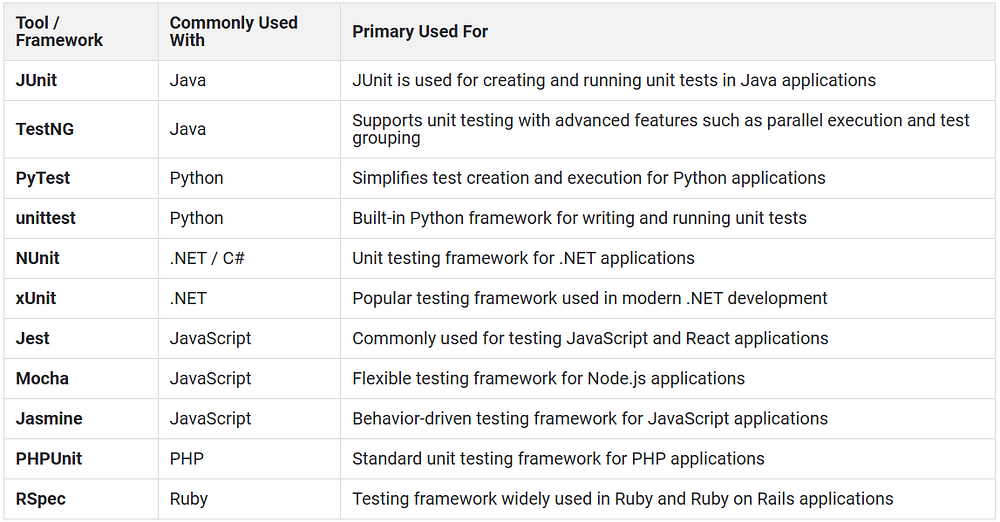
Unit Testing Tools and Frameworks
Different programming languages use different unit testing frameworks to create, execute, and manage automated tests. These tools help developers validate application logic, generate test reports, and integrate testing into CI/CD workflows.
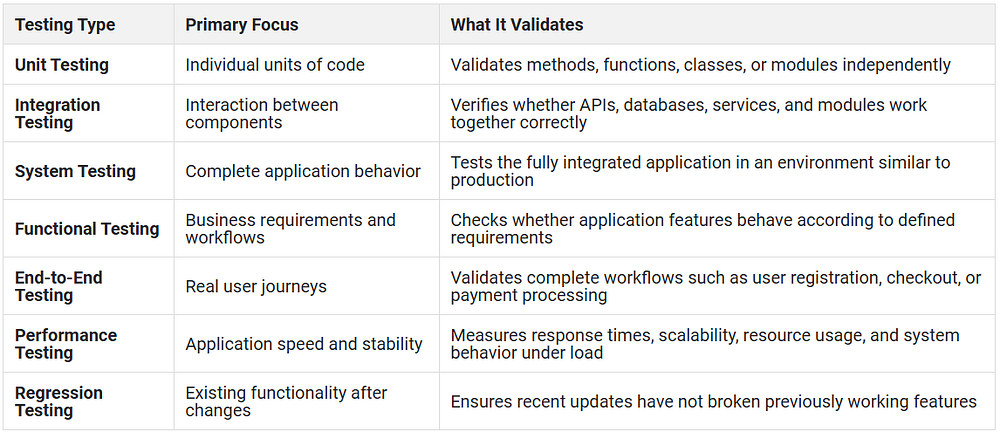
Unit Testing vs Other Testing Types
Common Challenges in Unit Testing
Despite its advantages, unit testing also comes with several implementation and maintenance hurdles. Here are some you need to know about:
- Writing effective unit tests requires a clear understanding of application logic, dependencies, and expected behavior. Poorly designed tests may validate incorrect assumptions or miss important scenarios.
- Maintaining unit tests becomes difficult when application logic changes frequently. Tests that are not updated alongside the codebase can produce false failures or lose relevance over time.
- Complex applications often rely on databases, APIs, third-party services, or asynchronous workflows. Isolating these dependencies during unit testing may require extensive mocking and additional setup.
- Excessive mocking can reduce test reliability if the mocked behavior differs significantly from real system behavior.
- Legacy applications with tightly coupled code structures are often difficult to unit test because individual components cannot be isolated easily.
- Teams sometimes focus only on code coverage percentages instead of validating meaningful business logic. High coverage does not always guarantee effective testing.
- Poorly written unit tests can increase maintenance effort and slow development workflows instead of improving reliability.
When Unit Testing is Not Enough
Unit testing validates individual units of application logic, but it cannot verify how the entire application behaves under real-world conditions.
For example, unit tests may confirm that a payment calculation works correctly, but they cannot verify whether the payment gateway, database, APIs, and frontend workflows function correctly together.
Unit testing alone also cannot identify:
- API communication failures between services
- Database integration issues
- UI rendering problems
- Network-related failures
- Performance bottlenecks under heavy traffic
- Device-specific behavior differences
- End-to-end workflow failures
Applications still require integration testing, system testing, functional testing, performance testing, and end-to-end testing to validate real user workflows and production behavior comprehensively.
Most modern teams use unit testing as the first layer of validation within a larger testing strategy rather than relying on it as the only testing method.
How HeadSpin Helps in Unit Testing
HeadSpin helps development and QA teams extend validation beyond isolated code testing by providing real-world testing across devices, applications, and network conditions.
Key capabilities that strengthen overall testing outcomes include:
- Real device testing helps teams validate whether application behavior remains consistent across different devices, operating systems, and environments after unit-tested code is integrated into the application.
- Performance monitoring and observability provide visibility into API delays, rendering issues, crashes, memory spikes, and network bottlenecks that unit tests cannot detect independently.
- Automated testing support allows teams to integrate broader validation workflows into CI/CD pipelines alongside unit testing processes.
- Cross-platform validation helps verify application behavior across different browsers, devices, and operating conditions during later testing stages.
- Root cause analysis capabilities help teams trace failures across application, device, and network layers when issues appear outside isolated code units.
Conclusion
Unit testing helps teams identify issues in application logic before they affect larger workflows. It improves code reliability, simplifies debugging, and supports safer code changes during continuous development.
However, unit testing alone is not enough to validate complete application behavior. Modern applications still require integration, functional, performance, and end-to-end testing to verify real-world user experiences across devices, APIs, and networks.
When combined with broader testing practices, unit testing becomes an important foundation for building stable and maintainable applications.
Originally Published:- https://www.headspin.io/blog/unit-testing-guide


Comments
Post a Comment