20 Best API Testing Tools in 2026
APIs connect applications, services, and users. When an API fails, transactions break, data stops flowing, and user experiences suffer. Testing helps teams verify that APIs behave as expected before issues reach production.
The core challenge is choosing the right one. Some tools focus on functional validation, others on automation, security, performance, or contract testing. A tool that works well for developers may not suit QA teams, while security-focused organizations often need capabilities beyond standard API validation.
This guide compares 20 API testing tools across different categories, including functional testing, automation, security, performance, and contract testing.
What Are API Testing Tools?
API testing tools help you create, run, and manage tests against your application programming interfaces. You send requests to endpoints, inspect the responses, and check behavior against the contract your API defines.
Manual testing still has its place during early development. But most teams lean on automated checks as part of a continuous testing strategy.
Different needs call for different categories of testing. Here are the main ones:
- Functional testing confirms each endpoint returns correct data and handles edge cases.
- Automation testing runs test suites on every build without manual triggering.
- Security testing finds vulnerabilities attackers could exploit, like injection flaws or broken authentication.
- Performance testing measures speed and stability when traffic spikes.
- Contract testing verifies that API providers and consumers honor a shared agreement.
A good tool makes this work scalable, so your quality and security standards hold steady as your API surface grows.
What to Look for in an API Testing Tool
The right tool fits your existing workflow rather than forcing you to rebuild it. Here’s what separates a strong option from a weak one.
1. Ease of use. The tool should be approachable for both engineers and non-coders. Many now offer no-code editors alongside scripting for teams with mixed skill levels.
2. Protocol support. Look for REST, SOAP, GraphQL, and gRPC coverage, plus async patterns like WebSockets and webhooks as event-driven architectures spread.
3. Test creation features. Visual builders, reusable components, data-driven testing, and AI-assisted generation all reduce setup time.
4. Assertions and validation. Strong checks on status codes, schemas, and data types keep your contract intact as the API evolves.
5. CI/CD integration. Tests that run on every build catch issues before they compound. This is table stakes now, not a bonus.
6. Reporting and analysis. Clear logs and visualizations tell you what failed, why, and what to fix first.
7. Collaboration. Shared workspaces and version control matter for distributed teams.
8. Extensibility. The ability to add plugins, run custom scripts, and connect to external servers allows a tool to adapt as your product grows.
No single tool nails every box. Weigh these features against where your current gaps actually hurt.
Top 20 API Testing Tools in 2026
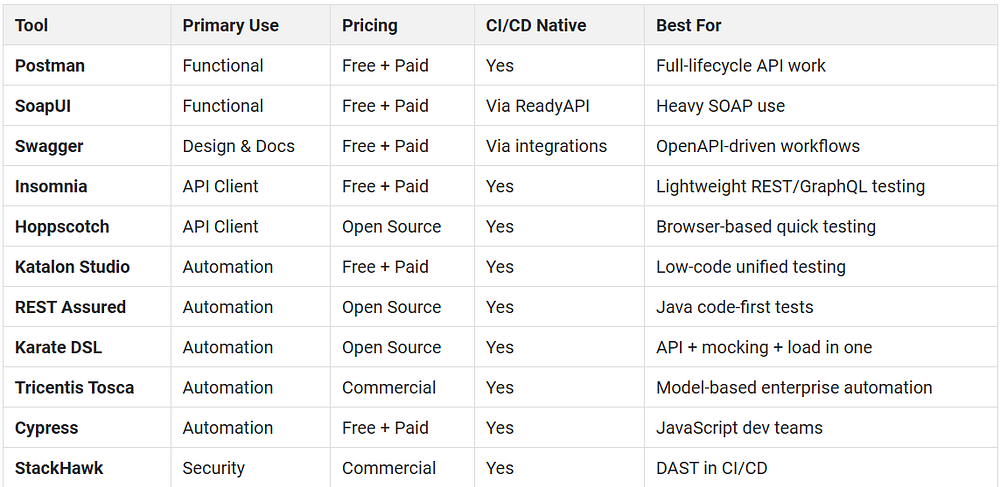
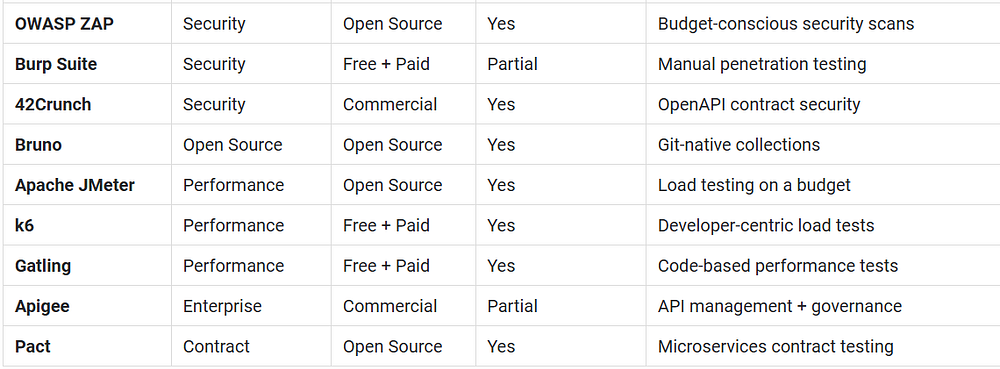
There’s no universal “best” tool here. The right pick depends on your protocols, your team’s coding comfort, and your budget. The table below gives you a fast overview, and the category breakdowns that follow go deeper on each.
Best API Testing Tools for Functional Testing
Functional testing confirms each endpoint does what the spec says. These tools center on that work.
1. Postman
Postman began as a REST client and now runs the full API lifecycle, from design to monitoring. Its Collections and Workspaces remain how most teams organize and share tests, and recent AI features let you describe tasks in plain language.
Pricing: Free plan available. Paid plans start at ~$9/user/month (billed annually).
Pros
- Supports REST, GraphQL, gRPC, WebSocket, and SOAP
- Strong collaboration through Collections and Workspaces
- Large community and extensive integrations
- Built-in monitoring and automation capabilities
Cons
- Can feel heavy for simple API testing needs
- Advanced governance and collaboration features require paid plans
- Large workspaces can become difficult to manage
Best for: Teams wanting one platform for API development, testing, and collaboration.
2. SoapUI
SoapUI has deep roots in SOAP testing and adds REST and web service coverage. Its Groovy scripting engine gives assertion flexibility few tools match. The commercial tier, ReadyAPI, layers on AI test generation and tighter CI/CD.
Pricing: SoapUI Open Source is free. ReadyAPI starts at $6,599 per license
Pros
- Strong SOAP testing capabilities
- Flexible Groovy scripting
- Built-in service mocking
- Supports both SOAP and REST APIs
Cons
- Interface feels dated
- Advanced features require ReadyAPI
- Steeper learning curve than lightweight API clients
Best for: Teams with heavy SOAP usage or complex assertion requirements.
3. Swagger
Swagger is primarily a design and documentation tool, but it enables testing through OpenAPI-driven workflows. Swagger UI generates interactive docs you can test endpoints from directly, tying development and testing around a shared spec.
Pricing: Paid plans starting at $22.80 per user per month
Pros
- Strong OpenAPI support
- Interactive API documentation
- Keeps documentation and testing aligned
- Widely adopted across the industry
Cons
- Not a complete testing platform
- Requires additional tools for advanced automation
- Limited test management capabilities
Best for: Teams whose testing workflows revolve around OpenAPI specifications.
4. Insomnia
Insomnia is a streamlined API client for REST, GraphQL, and gRPC. It favors a clean interface and quick request building over a sprawling feature set, which keeps the learning curve short.
Pricing: Free plan available. Paid plans starting from $12 per user / month .
Pros
- Clean and lightweight interface
- Strong GraphQL support
- Easy request creation and organization
- Plugin ecosystem for extensions
Cons
- Fewer collaboration features than Postman
- Smaller community ecosystem
- Limited enterprise governance capabilities
Best for: Developers who want a focused API client without unnecessary complexity.
5. Hoppscotch
Hoppscotch is an open-source, browser-based client that loads instantly with no install. It covers REST, GraphQL, and WebSocket testing and suits quick checks during development.
Pricing: Free and open source.
Pros
- Browser-based with no installation required
- Supports REST, GraphQL, and WebSockets
- Lightweight and quick to use
- Open-source project
Cons
- Limited enterprise features
- Not ideal for large test suites
- Collaboration capabilities are less mature
Best for: Quick API testing and ad hoc development work.
6. Katalon Studio
Katalon offers end-to-end automation built on open-source foundations like Selenium and Appium. API, web, and mobile tests live in one place, and its low-code approach pairs with AI-assisted generation for mixed-skill teams.
Pricing: Starts from $167 billed annually
Pros
- API, web, mobile, and desktop testing in one platform
- Low-code approach
- Self-healing test capabilities
- Suitable for mixed technical and non-technical teams
Cons
- Advanced capabilities require paid plans
- Resource-intensive compared to lightweight tools
- Some customization requires scripting knowledge
Best for: Teams looking for a unified testing platform across multiple channels.
7. REST Assured
REST Assured is the go-to Java library for REST API automation. Its fluent syntax produces readable test scripts that live alongside your application code, and it integrates with JUnit, TestNG, and Serenity.
Pricing: Free and open source.
Pros
- Purpose-built for Java API testing
- Readable fluent syntax
- Strong JSON and XML validation support
- Integrates well with JUnit and TestNG
Cons
- Requires Java knowledge
- No graphical interface
- Not suitable for non-technical users
Best for: Java teams wanting code-first API automation.
8. Karate DSL
Karate combines API testing, mocking, and performance testing in one framework. Its BDD syntax needs no step definitions, so even non-programmers can write tests, and its Gatling integration reuses functional suites as load tests.
Pricing: Free and open source. Commercial plans start from $640 per user / year
Pros
- Minimal coding required
- Combines API testing, mocking, and performance testing
- BDD-style syntax
- Reuses functional tests for load testing
Cons
- Requires learning Karate-specific syntax
- Less flexibility than full programming frameworks
- Smaller community than Postman or REST Assured
Best for: Teams wanting one framework for multiple testing needs.
9. Tricentis Tosca
Tosca takes a model-based approach to automation, generating tests from a model of the application rather than brittle scripts. That cuts maintenance when interfaces shift.
Pricing: Custom pricing.
Pros
- Model-based automation reduces maintenance
- Strong enterprise support
- Broad technology coverage
- Supports low-code test creation
Cons
- Expensive for smaller organizations
- Longer onboarding period
- Proprietary platform
Best for: Enterprises managing large-scale automation programs.
10. Cypress
Cypress is best known for end-to-end UI testing, but it also handles API testing well through its request commands. JavaScript and TypeScript teams can keep API and UI checks in one toolchain.
Pricing: Free open-source framework.
Pros
- Excellent developer experience
- Strong debugging capabilities
- Works well with JavaScript and TypeScript
- API and UI testing in one framework
Cons
- Primarily designed for UI testing
- API testing is not its primary focus
- Less suited for non-JavaScript teams
Best for: JavaScript teams already using Cypress for UI automation.
11. StackHawk
StackHawk is a DAST platform purpose-built to run API security checks inside CI/CD. It’s designed around the developer workflow, surfacing vulnerabilities with enough context to fix them without looping in a separate team. Its MCP server brings scans into AI coding assistants like Cursor and Claude Code.
Pricing: Custom pricing.
Pros
- CI/CD-focused security testing
- API security validation built into developer workflows
- Business logic and authorization testing
- Source-code-based API discovery
Cons
- Focused on security rather than functional testing
- Commercial licensing costs
- Requires security testing processes to get maximum value
Best for: Development and AppSec teams integrating API security into CI/CD.
12. OWASP ZAP
ZAP is a widely used open-source security scanner. It runs active and passive scans against APIs and integrates into pipelines, making it a practical entry point for teams without a security budget.
Pricing: Free and open source.
Pros
- No licensing costs
- Active community support
- Automated and manual security testing
- CI/CD integration support
Cons
- Can generate false positives
- Requires tuning and configuration
- Less polished than commercial security tools
Best for: Teams adding API security testing on a limited budget.
13. Burp Suite
Burp Suite is a staple for manual penetration testing, with strong interception and analysis tools. The professional tier adds automated scanning, though its strength remains hands-on testing.
Pricing: Starts from $499 onwards
Pros
- Industry-standard penetration testing toolkit
- Powerful traffic interception capabilities
- Deep vulnerability analysis
- Trusted by security professionals
Cons
- Manual testing focus
- Limited CI/CD automation compared to modern security platforms
- Professional edition requires licensing
Best for: Security engineers performing hands-on API penetration testing.
14. 42Crunch
42Crunch focuses on API security through the OpenAPI contract. It audits specs, enforces security policies, and protects runtime traffic, tying security to your API definition.
Pricing: Starts from $9 per month. Free trial available
Pros
- OpenAPI-driven security validation
- Security audits for API specifications
- Runtime protection capabilities
- Security integrated into API design workflows
Cons
- Most valuable when OpenAPI specifications are maintained
- Commercial licensing costs
- Security-focused rather than general API testing
Best for: Organizations standardizing API security around OpenAPI contracts.
Best Open-Source API Testing Tool
Open-source tools give you flexibility and no license cost but you trade that for self-managed setup and support. Several tools above are open source; this one stands out for treating tests as code.
15. Bruno
Bruno stores API collections as plain-text files on your filesystem instead of syncing to the cloud. Requests, scripts, and configs go straight into Git, just like your codebase, so you can branch, diff, and review them in pull requests.
Pricing: Free version available. Paid plans start from $6 user/month.
Pros
- Git-native collection storage
- Works offline with no cloud dependency
- Collections can be version-controlled alongside application code
- CLI runner supports CI/CD integration
Cons
- Smaller ecosystem than Postman
- Fewer built-in collaboration features
- Limited third-party integrations compared to mature platforms
Best for: Developer teams wanting API collections managed as code in Git repositories.
Best Tools for API Performance Testing
Performance testing tells you how your API behaves under pressure. These tools simulate heavy traffic so you find limits before users do.
16. Apache JMeter
JMeter has been the default open-source load testing tool for over two decades. It simulates thousands of concurrent users, supports data-driven tests via CSV, and runs anywhere Java does. It is a workhorse for finding performance bottlenecks.
Pricing: Free and open source.
Pros
- Mature and widely adopted load testing platform
- Supports high-volume performance testing
- Extensive plugin ecosystem
- Data-driven testing support through CSV and other data sources
Cons
- Interface feels dated
- Resource-intensive at very high concurrency levels
- Test script maintenance can become complex for large projects
Best for: Teams needing a proven and cost-effective load testing solution.
17. k6
k6 is a developer-focused load testing tool where you write tests in JavaScript. It fits naturally into CI/CD pipelines and produces clean, scriptable performance checks that treat performance as code.
Pricing: Free open-source version available. Paid plans start $0.15/ virtual user hour
Pros
- JavaScript-based scripting
- Designed for CI/CD workflows
- Clear performance metrics and reporting
- Lightweight and easy to automate
Cons
- No graphical test builder
- Requires scripting knowledge
- Some advanced cloud capabilities require paid plans
Best for: Development teams integrating performance testing directly into CI/CD pipelines.
18. Gatling
Gatling runs high-performance load tests using code-based scenarios written in Scala. It generates detailed reports out of the box and is known for its resource efficiency in handling high concurrency without overwhelming the test machine.
Pricing: Starts from €89/month
Pros
- Efficient resource utilization during load testing
- Detailed performance reports
- Supports complex test scenarios
- Handles large-scale concurrency effectively
Cons
- Scala-based DSL has a learning curve
- Less approachable for non-developers
- Smaller community than JMeter
Best for: Teams comfortable with code-based performance testing for large-scale workloads.
Enterprise-Grade API Testing & Management Tools
Enterprise teams need governance, monitoring, and compliance alongside testing. This option goes beyond testing into full lifecycle management.
19. Apigee
Apigee is Google Cloud’s API management platform. It earns a place here for testing-adjacent strengths: mock services, performance testing, and production monitoring, plus support for PCI DSS, HIPAA, and SOC2 compliance.
Pricing: Pay as you go pricing
Pros
- Comprehensive API lifecycle management
- Supports API monitoring and analytics
- Strong governance and policy management
- Compliance support for regulated industries
Cons
- More expensive than dedicated testing tools
- Can be complex to implement and manage
- Testing capabilities are secondary to API management
Best for: Enterprises that need API management, governance, monitoring, and testing within a single platform.
Best API Contract Testing Tools
Contract testing verifies that providers and consumers honor a shared agreement, catching integration breaks before staging. It’s become a staple in microservices pipelines.
20. Pact
Pact is the leading open-source contract testing framework. Consumers define expected interactions, and providers verify against them, so mismatches surface early in the pipeline rather than in production.
Pricing: Free and open source.
Pros
- Purpose-built for contract testing
- Helps identify integration issues early
- Strong support for microservices architectures
- Supports multiple programming languages
Cons
- Requires adoption of contract testing practices
- Introduces additional workflow steps
- Initial setup can be challenging for teams unfamiliar with consumer-driven contracts
Best for: Microservices teams looking to prevent integration failures between services before deployment.
API Testing Challenges Teams Face Today
Even with good tools, certain obstacles recur. Knowing them ahead of time helps you pick a tool that addresses your specific pain.
- Documentation gaps and schema drift. Incomplete docs stall testing, and frequent schema changes break existing tests. Tools that generate specs from code or docs from specs help close the gap. Automating schema validation in CI catches drift early.
- Test data and environment management. Sensitive or dynamic data needs careful handling, and shared environments create pollution across branches. Data-driven testing with external sources eases this, as does isolating environments per branch.
- Integration complexity. Correct data flow across services is hard to verify. Contract testing alongside mock servers lets you isolate tests from unstable dependencies.
- Maintenance burden. You will never cover every path. Prioritize test cases by risk, and lean on self-healing and AI-assisted generation to keep maintenance manageable as your API surface grows.
- Varying technical expertise. Mixed-skill teams struggle to standardize. Pairing low-code tools with code-first options lets each member contribute at their comfort level.
How to Choose the Right API Testing Tool
The right choice depends on your architecture, your team, and where your biggest risk gaps sit. Use these criteria to narrow the field.
1. Map your requirements: List the protocols you test (REST, SOAP, GraphQL, gRPC, async)and the testing types that matter most: functional, automation, security, performance, or contract. Match the tool’s strengths to that list.
2. Assess your team’s skills: Some tools demand coding knowledge; others offer low-code or no-code paths. Pick what your team can actually adopt, not what looks most powerful on paper.
3. Weigh the budget: Several strong tools are free and open source. Commercial tools cost more but often save setup and support time. Decide which trade-off fits.
4. Check CI/CD fit: A tool that runs on every build beats one that only runs when someone remembers to trigger it.
5. Evaluate support: A strong community or solid vendor documentation matters when you hit a wall.
Conclusion
The market for API testing tools in 2026 is wide. The right choice depends on your protocols, your team’s skills, and where your testing gaps are most acute. The 20 tools reviewed here cover a range of needs. They include functional clients, automation frameworks, security scanners, performance suites, and contract testing platforms. This variety should match almost any technical setup.
Do not over-index on the initial choice. Pick a tool that fits your workflow, integrate it into your CI pipeline, and refine your approach over time. A decent tool that runs on every build is better than a perfect tool that is never used.
If security is your primary gap, prioritize it early. Running security scans inside your CI/CD pipeline catches vulnerabilities alongside other test failures, rather than weeks later in a separate review.
Originally Published:- https://www.headspin.io/blog/top-20-tools-for-api-test-automation-for-effective-software-testing


Comments
Post a Comment