Exploratory Testing: A Complete Guide with Examples and Best Practices

Software rarely breaks, only where test cases expect it to break.
A login flow may pass all scripted checks but fail when the user switches networks midway through authentication. A checkout journey may work perfectly on a desktop browser but behave differently on a real mobile device with a smaller screen, weaker connectivity, or an interrupted payment session. A video app may pass functional tests but still feel frustrating because buffering, delay, or visual quality issues appear only under specific real-world conditions.
This is where exploratory testing becomes valuable.
Exploratory testing helps QA teams move beyond fixed scripts and investigate how software behaves when real users interact with it in unpredictable ways. It combines testing, learning, observation, and critical thinking in a single activity. Instead of simply confirming what is already known, testers actively search for what might be missed.
What Is Exploratory Testing?
Exploratory testing is a software testing approach where testers actively explore an application, design tests as they go, observe system behavior, and adjust their next steps based on what they discover.
Unlike scripted testing, where testers follow predefined test cases, exploratory testing gives testers room to investigate the product more freely. The tester may begin with a goal, a feature, or a user journey, but the exact path is not fully written in advance.
For example, a tester may start with a simple charter such as:
Explore the password reset flow for usability, error handling, and recovery behavior across different devices.
During the session, the tester may try invalid emails, expired reset links, weak passwords, slow networks, multiple reset requests, browser refreshes, and device switching. Each observation shapes the next test idea.
Exploratory testing is not random clicking. Good exploratory testing is guided by skill, product understanding, risk awareness, and clear documentation. The tester explores with intent.
Why Exploratory Testing Matters in Modern QA
Modern applications are too complex to depend only on scripted test cases.
Users move between devices, networks, browsers, operating systems, locations, and app versions. They multitask. They abandon flows midway. They enter unexpected data. They use older devices. They switch between Wi-Fi and mobile networks. They do things product teams may not have predicted.
Scripted testing is excellent for checking known requirements, repeatable workflows, and regression coverage. But it cannot easily cover every unknown behavior, edge case, or usability concern.
Exploratory testing helps teams:
- Find bugs that scripted tests may miss: Exploratory testing is useful for uncovering hidden bugs and defects, unusual user paths, confusing interactions, and errors caused by unexpected combinations of actions.
- Improve user experience: A feature may technically work but still feel slow, unclear, or difficult to use. Exploratory testing helps testers evaluate the product from a user’s point of view.
- Support agile development: When features change quickly, full test documentation may not always be ready. Exploratory testing allows QA teams to provide early feedback while requirements are still evolving.
- Strengthen test coverage: Exploratory sessions can reveal gaps in existing test cases and help teams decide what should later be automated or added to regression suites.
- Test real-world behavior: For mobile, web, OTT, gaming, banking, retail, and media applications, real-world conditions matter. Device behavior, network quality, location, performance, and usability can all affect the final user experience.
Exploratory Testing vs Scripted Testing
Exploratory testing and scripted testing are not opposites. They solve different problems and work best together.
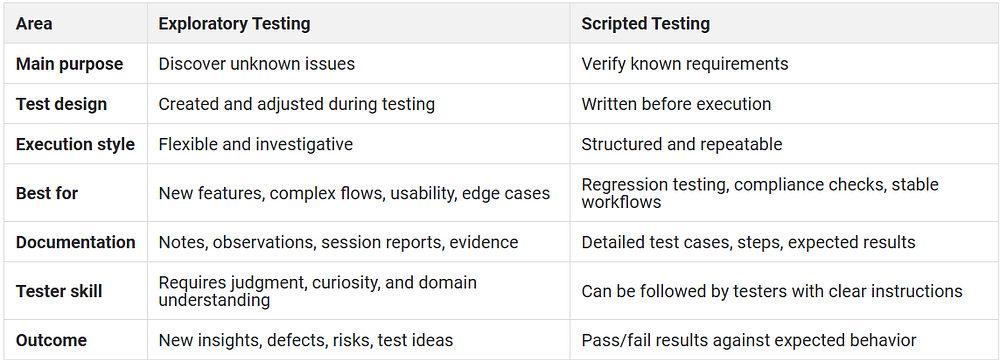
Here’s the thing: scripted testing tells you whether the product behaves as expected. Exploratory testing helps you find out what you did not expect.
A strong QA strategy uses both. Scripted tests protect known functionality. Exploratory testing expands the team’s understanding of product risk.
Exploratory Testing vs Ad Hoc Testing
Exploratory testing is often confused with ad hoc testing, but they are not the same.
Ad hoc testing is usually informal and unstructured. A tester may use the application freely without a clear objective, documentation, or time limit. This can sometimes uncover defects, but it is difficult to measure, repeat, or learn from.
Exploratory testing is more disciplined. It allows flexibility, but it still has a purpose.
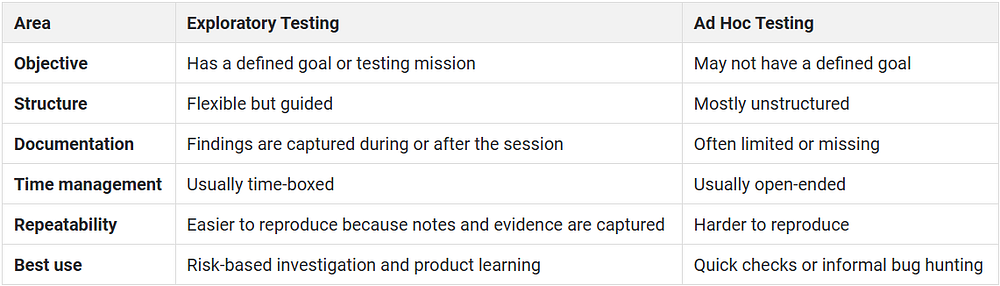
A simple way to understand it:
Ad hoc testing says, “Let me try this and see what happens.”
Exploratory testing says, “Let me investigate this area, learn from the system, and record what I find.”
Types of Exploratory Testing
Exploratory testing can be done in different ways depending on the product, team maturity, and testing objective.
1. Freestyle Exploratory Testing
Freestyle exploratory testing gives testers maximum freedom. The tester explores the application without a detailed charter or predefined path.
This works well when:
- The team wants quick feedback
- The product area is new or unfamiliar
- The tester is investigating a reported defect
- There is limited time before release
Freestyle testing is flexible, but it can become messy if testers do not capture notes, evidence, or defect details.
2. Scenario-Based Exploratory Testing
Scenario-based exploratory testing focuses on real user journeys.
Instead of testing isolated features, testers explore how users complete meaningful tasks. For example:
- A banking user transfers money and checks transaction history
- A retail user applies coupons, changes quantity, and completes checkout
- A streaming user starts playback, switches networks, and resumes content
- A travel app user searches, filters, books, cancels, and rebooks
This type of exploratory testing is useful because users rarely interact with software feature by feature. They move through connected journeys.
3. Strategy-Based Exploratory Testing
Strategy-based exploratory testing uses specific testing techniques to guide exploration.
Testers may apply:
- Boundary value analysis
- Equivalence partitioning
- Error guessing
- Risk-based testing
- State transition testing
- Persona-based testing
- Compatibility testing
- Usability heuristics
This approach works well for experienced QA teams that want exploratory testing to be flexible but still systematic.
4. Session-Based Exploratory Testing
Session-based exploratory testing organizes exploration into time-boxed sessions. Each session usually has:
- A test charter
- A fixed duration
- A defined scope
- Notes and evidence
- A debrief after execution
This is one of the most practical formats for teams that want exploratory testing to be measurable and repeatable without making it too rigid.
5. Pair Exploratory Testing
In pair exploratory testing, two people test together. One person drives the session by interacting with the application, while the other observes, asks questions, takes notes, and suggests new paths.
This approach is useful when QA, development, product, or design teams need shared understanding of a feature.
When To Do Exploratory Testing?
Exploratory testing can happen at different stages of the software development lifecycle. It is especially valuable when the team needs fast learning, deeper investigation, or user-centered feedback.
Use exploratory testing when:
1. Requirements are still evolving
Early in development, requirements may not be complete. Exploratory testing helps teams understand how a feature behaves before formal test cases are finalized.
2. A new feature is ready for early validation
Before writing detailed test cases, testers can explore the feature and identify gaps in logic, design, error handling, and usability.
3. The product area is complex or high risk
Payment flows, authentication, onboarding, video playback, search, checkout, trading, booking, and account management often involve multiple systems. Exploratory testing helps uncover issues that appear only when these systems interact.
4. A defect needs deeper investigation
When a bug is difficult to reproduce, exploratory testing helps testers experiment with different paths, data, devices, and environments until patterns become clearer.
5. Automation coverage is not enough
Automated tests are powerful, but they follow programmed checks. Exploratory testing helps teams discover new scenarios that automation may later include.
6. User experience needs validation
Exploratory testing is useful when the team wants to understand whether the product feels clear, responsive, and usable across real conditions.
7. The release timeline is tight
When there is not enough time to create detailed test cases for every scenario, exploratory testing helps teams focus on the highest-risk areas quickly.
How to Perform Exploratory Testing
Exploratory testing works best when it has just enough structure. Too much structure turns it into scripted testing. Too little structure makes it hard to learn from the session.
Here is a practical process teams can follow.
1. Define the testing objective
Start with a clear mission. The objective should explain what the tester is exploring and why.
For example:
- Explore the signup flow for usability issues, validation gaps, and device-specific behavior.
A good objective keeps the session focused without restricting the tester too much.
2. Create a test charter
A test charter is a short guide for the session. It usually includes:
Feature or area to test
- Goal of the session
- Risks to investigate
- Devices, browsers, or environments to use
- User personas or data variations
- Time limit
- Expected evidence
Example charter:
- Explore the mobile checkout flow on real Android and iOS devices. Focus on coupon handling, payment failure recovery, network interruptions, and cart persistence.
3. Choose the right environment
The environment matters. A flow that works in a controlled setup may behave differently on real devices, real browsers, or real networks.
For mobile and web apps, consider testing across:
- Different screen sizes
- Operating system versions
- Device models
- Network conditions
- Browsers
- Locations
- App versions
- User account types
4. Time-box the session
Most exploratory testing sessions work well when they are time-boxed. A common range is 45 to 120 minutes, depending on the complexity of the feature.
Time-boxing helps testers stay focused and makes the session easier to review.
5. Explore, observe, and adapt
During the session, the tester interacts with the product, watches how it behaves, and adjusts the next steps based on findings.
For example, if a payment failure produces a confusing error message, the tester may then explore:
- Retry behavior
- Back button behavior
- Cart persistence
- Duplicate payment prevention
- Network interruption
- Transaction history updates
The session evolves based on what the tester learns.
6. Capture evidence as you test
Exploratory testing should leave a useful record. Testers should capture:
Steps followed
Devices and environments used
- Test data
- Screenshots
- Screen recordings
- Logs
- Network behavior
- Observed issues
- Questions or concerns
- Ideas for new test cases
This makes defects easier to reproduce and gives developers better context.
7. Debrief with the team
After the session, the tester should review findings with the relevant team members. This may include QA, developers, product managers, designers, or release owners.
The debrief should answer:
- What was tested?
- What was found?
- What remains unclear?
- Which issues are high priority?
- Which scenarios should become regression tests?
- Is another exploratory session needed?
8. Convert findings into action
Exploratory testing should not end with notes. The team should use findings to improve the product and testing strategy.
Possible follow-up actions include:
- Create defect tickets
- Update acceptance criteria
- Add regression test cases
- Automate repeatable checks
- Create new charters
- Update product documentation
- Improve monitoring or performance thresholds
Real-World Exploratory Testing Examples
Example 1: Mobile Banking App
A QA team is testing a fund transfer feature.
A scripted test may check whether a user can select a beneficiary, enter an amount, authenticate, and complete the transfer.
An exploratory tester goes further. They try:
- Switching from Wi-Fi to mobile data during authentication
- Entering the wrong OTP multiple times
- Closing the app after payment confirmation
- Returning to the app from a push notification
- Using the feature on an older Android device
- Checking whether transaction history updates correctly
- Testing the flow under slow network conditions
This may reveal issues such as delayed confirmation, duplicate transaction confusion, unclear error messages, or inconsistent history updates.
Example 2: E-commerce Checkout Flow
A retail app team is preparing for a sale event.
Exploratory testing focuses on the full checkout journey. The tester adds multiple products, applies and removes coupons, changes delivery addresses, switches payment methods, and abandons checkout midway.
The tester may find that:
- The cart total does not refresh after coupon removal
- Out-of-stock items remain visible in checkout
- Address changes reset delivery options
- Payment failure does not return the user to the right state
- The checkout button overlaps with the keyboard on smaller screens
These issues may not appear in simple scripted tests but can directly affect conversion.
Exploratory Testing Techniques
Exploratory testing improves when testers use proven techniques rather than relying only on instinct.
1. Boundary Value Exploration
Test inputs at the edges of allowed ranges.
Examples:
- Minimum and maximum password length
- Lowest and highest transfer amount
- Maximum cart quantity
- Longest allowed name or address
- Date fields at month-end or leap year
2. Error Guessing
Use experience to predict where defects may occur.
For example, testers may explore:
- Empty fields
- Invalid formats
- Repeated clicks
- Expired sessions
- Interrupted flows
- Duplicate submissions
- Unsupported file types
3. Persona-Based Testing
Test the product from the viewpoint of different users.
Examples:
- First-time user
- Power user
- Admin user
- Low-connectivity user
- User on an older device
- User with accessibility needs
- User switching between devices
4. Risk-Based Exploration
Focus testing on areas with the highest business or user impact.
High-risk areas may include:
- Payments
- Authentication
- Security-sensitive workflows
- Data submission
- Account settings
- Media playback
- Checkout
- Core revenue flows
5. State Transition Testing
Explore how the application behaves when it moves between states.
Examples:
- Logged out to logged in
- Cart empty to cart populated
- Payment pending to payment failed
- Offline to online
- Video paused to resumed
- Session active to expired
6. Data Variation Testing
Use different data combinations to find hidden issues.
Examples:
- Long names
- Special characters
- Multiple currencies
- International phone numbers
- Different file sizes
- Empty optional fields
- Mixed language inputs
7. Interrupt Testing
This is especially useful for mobile apps.
Test what happens when the user receives a call, loses connectivity, locks the screen, changes orientation, switches apps, or receives a system notification during a key flow.
Best Exploratory Testing Tools
The right tools make exploratory testing easier to document, reproduce, and act on. The goal is not to automate exploration itself. The goal is to support the tester with better evidence, visibility, and environment coverage.
1. HeadSpin
HeadSpin supports exploratory testing by giving teams access to real devices, real networks, and real-world environments. Testers can interact with mobile, web, and connected experiences while capturing session evidence, logs, performance data, and user experience signals.
This is especially useful when teams need to validate how an application behaves across device models, network conditions, locations, operating systems, and user journeys.
HeadSpin can help exploratory testing teams:
- Test on real iOS and Android devices
- Validate behavior across real network conditions
- Capture session recordings for better defect reproduction
- Review performance and experience data during testing
- Investigate device, app, and network behavior together
- Turn exploratory findings into stronger regression coverage
For teams testing mobile apps, OTT experiences, banking apps, retail journeys, gaming flows, or media playback, this real-world context is critical.
2. Browser Developer Tools
Browser developer tools help testers inspect web applications during exploratory sessions. Testers can check console errors, network requests, page performance, storage behavior, and responsive layouts.
They are useful for web and mobile web exploratory testing.
3. Mobile Debugging Tools
Mobile debugging tools help testers review app logs, device behavior, crashes, memory usage, and performance issues.
For exploratory testing, these tools are useful when a visible issue needs deeper technical evidence.
4. Screen Recording and Session Capture Tools
Screen recordings make exploratory testing easier to review. When a defect is difficult to reproduce, a recording can show the exact path, timing, and conditions that led to the issue.
This is useful for developers because they do not have to rely only on written steps.
5. Bug Reporting and Issue Tracking Tools
Exploratory findings should be converted into actionable tickets. A good bug report should include the issue, environment, steps, actual result, expected result, evidence, severity, and any supporting logs.
Issue tracking tools help teams prioritize and monitor these findings.
6. Test Management Tools
Test management tools help organize charters, sessions, test notes, and follow-up actions. They are useful when exploratory testing becomes part of a regular QA process.
7. Input and Edge Case Testing Extensions
Input testing tools can generate unusual values, boundary data, special characters, long strings, and invalid inputs. These are useful for form testing, validation checks, and negative testing.
8. Network Analysis Tools
Network analysis tools help testers inspect requests, responses, latency, failures, and API behavior. They are useful when exploring performance, checkout, login, streaming, and data-heavy workflows.
Challenges and Limitations of Exploratory Testing
Exploratory testing is valuable, but it is not a replacement for every other testing method.
1. It depends heavily on tester skill
The quality of exploratory testing depends on the tester’s product knowledge, curiosity, technical understanding, and ability to observe patterns.
An inexperienced tester may miss important risks or spend too much time on low-impact areas.
2. It can be hard to measure coverage
Because exploratory testing does not follow a fixed list of test cases, it can be difficult to prove exactly what was covered unless the team uses charters, notes, and session reports.
3. Defects may be difficult to reproduce
If testers do not capture enough evidence, developers may struggle to reproduce the issue. This is why session recording, logs, screenshots, and environment details matter.
4. It can become unfocused
Without a clear charter or time limit, exploratory testing can turn into random testing. This reduces its value.
5. It is not ideal for compliance-heavy validation
Some industries and workflows require formal, repeatable, auditable test evidence. Exploratory testing can support these efforts, but it should not replace structured validation where traceability is required.
6. It should not replace automation
Exploratory testing helps find new risks. Automation helps check known risks repeatedly. Teams need both.
Best Practices for Exploratory Testing
1. Start with a clear charter
Every session should have a purpose. A charter keeps testers focused while still allowing them to follow useful discoveries.
Example: Explore the checkout journey on mobile devices with a focus on coupon handling, payment failure, and cart recovery.
2. Keep sessions time-boxed
Time-boxing improves focus. It also makes exploratory testing easier to plan, compare, and review.
3. Test on real environments whenever possible
Simulators and controlled environments are useful, but they do not always show real user conditions. For mobile apps, real devices and real networks are especially important.
4. Capture evidence continuously
Do not wait until the end of the session to document findings. Capture notes, screenshots, recordings, logs, and environment details as you test.
5. Focus on risk, not random coverage
Start with areas that matter most to users and the business. Payments, login, search, checkout, onboarding, streaming, and account management often deserve deeper exploration.
6. Include different user personas
A feature may behave differently for new users, returning users, admin users, low-connectivity users, or users on older devices.
7. Debrief after every session
A short debrief helps the team turn observations into decisions. This is where testers clarify severity, identify follow-up work, and decide what should be automated.
8. Convert repeatable findings into regression tests
If an exploratory session reveals a bug that could return later, convert it into a regression test after the fix. This prevents the same issue from escaping again.
9. Pair testers with developers or product managers
Pairing helps teams understand issues faster. Developers can see the problem directly, product managers can clarify expected behavior, and testers can ask better questions.
10. Keep exploratory testing visible
Exploratory testing should not live only in the tester’s head. Share session notes, charters, recordings, and defect summaries with the team.
Future Trends in Exploratory Testing
Exploratory testing is becoming more important as software systems become more connected, personalized, and experience-driven.
1. AI-assisted testing will support exploration
AI can help testers generate test ideas, summarize session notes, identify patterns, and suggest edge cases. ACE by HeadSpin helps with this. You can generate test cases through prompts using simple English. ACE will create executable automation scripts from those prompts, run them on real devices, and adapt the steps when UI elements change, helping teams move from test planning to execution faster.
However, human judgment will remain essential because exploratory testing depends on observation, curiosity, and context.
2. Exploratory testing will become more data-driven
Teams will increasingly combine exploratory testing with performance data, logs, user analytics, crash reports, and real-device insights. This helps testers focus on areas where users are most likely to face issues.
3. Real-device testing will become more central
As device fragmentation grows, testing only in controlled environments will not be enough. Exploratory testing on real devices, networks, and locations will help teams understand how applications behave outside lab conditions.
4. More exploratory findings will feed automation
Exploratory testing will continue to act as a source of new regression tests. When testers discover important bugs, teams can convert those scenarios into automated checks.
5. User experience will matter as much as functionality
Modern QA is not only about whether a feature works. It is also about whether the experience is fast, clear, stable, and reliable. Exploratory testing helps teams evaluate the product the way users experience it.
6. Continuous exploratory testing will support faster releases
Exploratory testing will become more integrated into agile and CI/CD workflows. Instead of waiting until the end of a release, teams will use short exploratory sessions throughout development.
Conclusion
Exploratory testing gives QA teams a practical way to find the issues that scripts, automation, and requirement documents may miss. It helps testers think like users, investigate risk, and learn from the product as they test.
It is not a replacement for scripted testing or automation. It works best alongside them. Scripted tests confirm known behavior. Automation protects repeatable workflows. Exploratory testing uncovers the unexpected.
For modern applications, especially mobile, web, OTT, banking, retail, gaming, and media experiences, exploratory testing becomes even stronger when teams test under real-world conditions. Device differences, network changes, location, performance, and user behavior can all shape the final experience.
HeadSpin helps teams bring that real-world context into exploratory testing. With access to real devices, real networks, session evidence, performance insights, and experience-focused analysis, QA teams can investigate issues more effectively and turn findings into better releases.
Originally Published:- https://www.headspin.io/blog/a-guide-on-exploratory-testing-with-headspin


Comments
Post a Comment